Initial Conditions
The HD Module needs initial conditions for the water level and the discharge.
The water level is initialised based on the following list, where the order of the list determines the condition that is applied, the top ones being “stronger” than the bottom ones.
-
Minimum water depth
-
State value
-
Hot-start value
-
Local initial value, also called parameter value
-
Flush in from outlets/water level boundaries
-
Flush out: fill up depressions
-
Minimum node levels from surrounding reaches
-
Global initial value
-
Empty system
Similarly for discharge:
-
State value
-
Hot-start value
-
Local initial value, also called parameter value
-
Natural flow condition
-
Global initial value
The initial conditions are set in the following order:
-
Empty system initialisation; all water levels are set to the minimum water depth, discharges to zero
-
State start is applied, if present. All other conditions are skipped if a start state is present
-
Hot-start, parameter start and global values are set, if present
-
Flush-out is applied, if activated
-
Flush-in is applied, if activated
-
Minimum node levels from surrounding reaches are applied, if activated
-
Natural flow is applied, if activated
Minimum water depth
The minimum water depth must always be satisfied, that is to say, if a condition sets a value below the minimum water depth, it is set to be the minimum water depth. For initial conditions this is the minimum water depth set in the HD parameters.
The default value for a MIKE 11 setup is the level of the bottom slot. Note that this is below the bottom level in the reach.
For MIKE+ setups, a default initial water depth equal to 0.5% (but not more than 0.005m) is used of the characteristic dimension of the conduit (diameter for circular pipes). For MIKE+ type nodes, the minimum water depth is the smallest of the minimum water depth and max(0.005 * connecting pipe heights).
In cases of applications with initially dry systems (dry weather flow), the volume of artificially generated water may be significant compared to the dry weather flows. This may compromise the volume balance analysis. Therefore, in such cases the default minimum depth can be reduced by setting the parameters BRANCH_MIN_H_REL (controls the minimum depth relative to the conduit size) and BRANCH_MIN_H_ABS (controls the absolute depth of the minimum water depth) to appropriate values (in the DHIAPP.INI file).
Initial conditions provided state start
Not yet supported.
Local initial conditions / parameter values
Local initial conditions can be specified for certain reaches and nodes, in order to make the initial state as realistic as possible.
Initial conditions provided by hotstart
Initial conditions can be loaded from previously calculated model runs by specifying one ore more result files. Values for the water level, discharge etc. is loaded from the result file at a specified time. Values at any time contained in the interval covered by the result file can be chosen as an initial condition. Such a result file used for initial conditions is called a hotstart file.
The result files used for hotstart do not have to cover the entire network. If the first hotstart file does not cover the entire network, the remainder of the network will be initialised by the next hotstart file, if present. If two or more hotstart files cover some part of the network, the first hotstart file specified in the list of hotstart files will be used. For parts of the network that are not covered by any hotstart file, a “weaker” initial condition type is applied.
A hotstart file does not need to match the input network exactly, i.e. the number of grid points in a reach can be different in the hotstart file and in the network. In that case interpolation is performed to calculate the values at the network grid points.
Flush out
Flush out is what happens if the network is completely filled and left alone until a steady state is reached, i.e., all depressions are filled up.
The flush out will only work if the network has at least one open boundary (water-level/QH etc.).
The flush-out levels used are the water levels defined on outlet/water level boundaries at simulation start time, or the bottom level for all other types of open boundary conditions.
If two boundaries flush the same part of the network, the lowest one wins. If there is already a weaker initial condition set (a global water level), the flush-out will not lower that value, only increase it.
Flush out is disabled by default.
Flush-in from boundaries
If water level boundaries/outlets in the system are specified with initial water level higher than the outlet bottom, it is assumed that a horizontal water surface extends inside the system, until the point in the system where the water level coincides with the bottom level (see the initial conditions with backwater outlet (water has been flushed in from the boundary)).
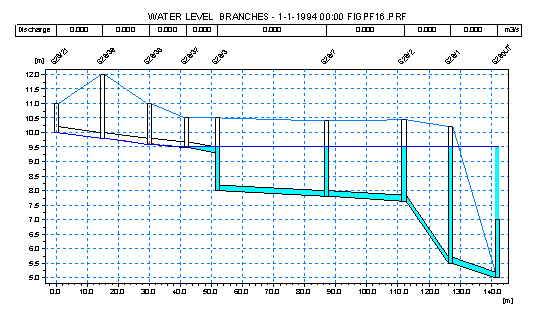
Figure: Initial conditions with backwater outlet (water has been flushed in from the boundary).
This procedure is called flush-in. The flush-in is also stopped if it meets a stronger initial condition.
Outlets/water level boundaries that are to be used as flush-in boundaries, must be marked as so.
The boundaries are flushed, with the lowest water level value flushed first. If two boundaries flush into the same part of the network (not recommended!), the highest water level “wins”.
The outlets from a MU setup are automatically marked for flush in.
No boundaries from a M11 setup are automatically marked for flush in.
Minimum node levels from surrounding reaches
Node levels can be corrected so that they are not lower than any of the surrounding reaches.
This is activated by default.
Disabled by default in MIKE 11 setups.
Natural flow
Natural flow can be calculated for grid points for which no stronger conditions have been set. The natural flow condition is based on the water level condition set in previous steps.
By default the natural flow is not activated.
In MIKE+ type setups, the natural flow is by default activated.