Bottom Slots
During low flow conditions (the local water depth is less than DELH, where DELH is a user specified parameter) a bottom slot can be introduced into the computations. The slot starts DELH over the bottom and extends 5 times DELH below the cross section bottom, see the schematic diagram showing the geometry of a bottom slot.
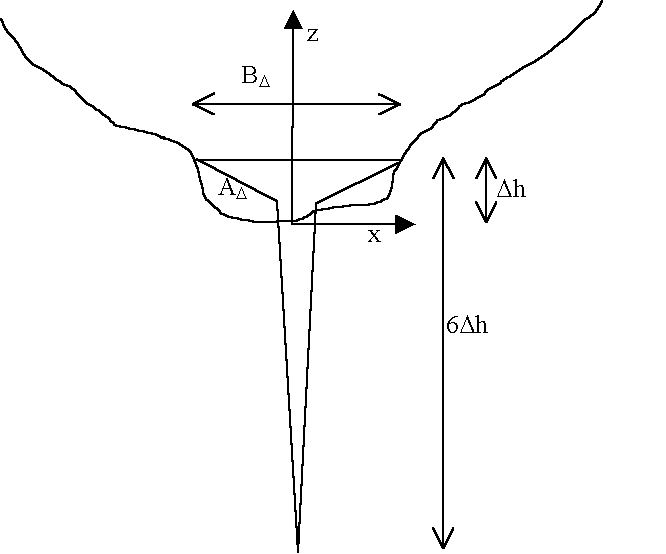
Figure: Schematic diagram showing the geometry of a bottom slot, starting at depth DELH above the bottom and extending 5 times DELH below.
There are two different alternatives for the description of the slot.
Classical bottom slot
The classical bottom slot description is given by
Equation: Width of the narrow slot cover as a function of height above the node bottom.
where z is the water depth with origin at the bed (lowest cross section point), i.e. it can be negative. It has the area
Equation: Cross-sectional area of the narrow slot cover, integrated from the width function.
Area preserving bottom slot
As an alternative the slot may given a geometry such that the cross sectional area at the top of the slot matches exactly that of the cross section at that level, i.e. the area varies continuously across the level at which the slot is introduced.
The width B of the slot is given by the following expression
Equation: Width of the narrow slot cover as a function of height above the node bottom.
where
ADis the cross sectional area Dh above the bottom
BDis the channel width at the same level.
Dh is the user defined DELH.
and
Equation: Reference elevation used in the narrow slot cover geometry.
The choice of slot description is set in the MIKE11.ini file through the variable AREA_PRESERVING_SLOT. The default setting is the classical description e.g. the width of the narrow slot cover as a function of height above the node bottom.